User Interface Layer
This layer is responsible for managing communication with the application's consumer. If you used generators files have been automatically generated for you. We'll still explain in detail how they work.
API
One of the most common scenarios is the API user interface layer. Here you can create endpoints and develop a full restful application. Much of the heavy-lifting is done by the UpDevs SDK and here we'll show exactly how to set it up properly.
Server Configuration
To set up the server, the UpDevs SDK provides a tool that makes it very straightforward, it's Setup.RunServer. In your Program.cs file,
after you've instantiated your startup class, just invoke the RunServer method:
using YourProject.UserInterface.API;
using YourProject.UserInterface.API.Filters;
using UpDevs.Sdk.UserInterface.API;

var startup = new Startup();

Setup.RunServer<Startup, ExceptionFilter, Guid>(args, startup);
File Startup.cs
The Startup.cs file holds the basic configuration of your app. Even though this file is no longer required, we maintained its usage due to
the fact it helps to maintain the code organized. In this section you'll find out all the options you have to configure the application.
But first, let's see the different types of startup files the UpDevs SDK provides and what they do.
Types
The UpDevs SDK provides three different types of Startup classes, they are: BaseStartup, BaseOAuthSecurityStartup and
BaseSecurityStartup. Both BaseOAuthSecurityStartup and BaseSecurityStartup inherit from BaseStartup. In this section we're
going to talk in detail about each one of them. Let's start with BaseStartup.
BaseStartup
This is the most basic form, providing the required functionality for the UpDevs SDK to work properly. It doesn't include any security
configuration. The structure is the following: BaseStartup<TExceptionFilter, TId>. We must provide the type of our ExceptionFilter and ID.
In the constructor, we must provide the types from each one of our layers, Domain, Application, etc. By doing so, all the services will be automatically loaded.
In the ConfigureServices, we can add extra functionalities to our project, like persistence. By invoking
base.ConfigureServices(services);, we are adding the core functionalities of the UpDevs SDK along with Domain and Application layers
handling. Apart from these, all the other configurations set up in the constructor are also executed here.
Here's a full example:
public class Startup : BaseStartup<ExceptionFilter, Guid>
{
    public Startup()
    {
        TypeFromContractsAssembly = typeof(ICategoriesDomainService);
        TypeFromDomainContractsAssembly = typeof(ICategoriesDomainService);
        TypeFromApplicationAssembly = typeof(CategoriesAppService);
        TypeFromDomainAssembly = typeof(CategoriesDomainService);
        TypeFromAutoMapperProfilesAssembly = typeof(AutoMapperProfile);
        TypeForManagementService = typeof(ManagementDomainService);
        TypeFromPersistenceAssembly = typeof(DatabaseContext);
    }

    public override void ConfigureServices(IServiceCollection services)
    {
        base.ConfigureServices(services);
        services
            .AddPersistence<DatabaseContext>()
            .AddSwaggerGen(c =>
            {
                c.SwaggerDoc(
                    "v1",
                    new OpenApiInfo { Title = "UpDevs Demo", Version = "v1"
                });
            });
    }

    public override void Configure(WebApplication app)
    {
        if (app.Environment.IsDevelopment())
        {
            app.UseDeveloperExceptionPage();
            app.UseSwagger();
            app.UseSwaggerUI(c => c.SwaggerEndpoint("/swagger/v1/swagger.json", "UpDevs Demo v1"));
        }

        base.Configure(app);
    }

    protected override Dictionary<string, string> GetUpDevsSdkVersions()
    {
        var baseVersions = base.GetUpDevsSdkVersions();

        baseVersions.Add(
            "UpDevs.Sdk.Cloud",
            typeof(UpDevs.Sdk.Cloud.Abstractions.IConnection).GetVersion()
        );
        baseVersions.Add(
            "UpDevs.Sdk.Data.EntityFramework",
            typeof(UpDevs.Sdk.Data.EntityFramework.Abstractions.BaseContext).GetVersion()
        );

        return baseVersions;
    }
}
Overriding the GetUpDevsSdkVersions is optional. It's useful when you'd like to keep track of the versions being used in your project.
They are accessible through the URL /versions: GET https://your-project-url.net/versions
From the constructor you can configure much of the UpDevs SDK's behavior. Here's a full list of the available configurations:
| Property | Type | Description |
|---|---|---|
| SupportedCultures | CultureInfo[] | List of accepted/managed languages. |
| DefaultCulture | RequestCulture | Default language. Will be used if the requested one can't be found. pt-BR will be used by default if none is provided. |
| TypeForDataAnnotationResourceClass | Type? | Type of the class with messages being used as a resource in the data annotations for localization. To work, the UseDataAnnotationsLocalization should be true. |
| UseDataAnnotationsLocalization | bool | Whether the localization should be used in the data annotations. |
| DisableAutoSave | bool | Database operations are automatically saved by the UpDevs SDK. If you wish to disable that behavior, set this option to true. |
| TypesFromResourceAssemblies | Type[]? | Each item represents one type in the assembly containing localization resources you wish to add to the application. |
| TypeFromApplicationAssembly | Type? | Type in the application layer assembly. |
| TypeFromDomainAssembly | Type? | Type in the domain layer assembly. |
| TypeFromContractsAssembly | Type? | Type in the contracts layer assembly. |
| TypeForManagementService | Type? | Type of the class implementing IManagementDomainService<TId>. |
| TypeFromDomainContractsAssembly | Type? | Type in the contracts assembly for the domain layer. May be the same one as TypeFromContractsAssembly. |
| TypeFromAutoMapperProfilesAssembly | Type? | Type in the assembly that contains the profile to setup the AutoMapper, if using AutoMapper. |
| TypeForMapperConfiguration | Type? | Type of the implementation of the IMapperConfiguration. |
| TypeFromPersistenceAssembly | Type? | Type in the persistence layer assembly. |
| IsTest | bool | Whether the project is being executed as part of a test. |
| ShouldExcludeNullValuesFromJsonReturn | bool | Whether properties with null values should be removed from the JSON response. It is enabled by default to keep data size as small as possible. |
| ShouldIgnoreJsonReferenceLoopHandling | bool | Whether properties in a circular loop should be ignored. It is enabled by default to prevent common errors. |
| CorsAllowAll | bool | Whether CORS should be completely open. or security purposes, it is disabled by default. Please, use it with caution and never in production environments. |
| UseCamelCasePropertiesReturn | bool | Whether camelCase should be used for properties names when returning data from an API call. Enabled by default to maintain the default response expected for most REST APIs. |
| UseDashesForControllers | bool | Whether dashes should be use to generate controllers' names. Enabled by default to maintain the default structure expected for most REST APIs. |
| UseValidationErrorFilter | bool | Whether the filter that makes validation of encountered errors should be used. This filter returns the errors as a JSON list and uses the status code BadRequest. |
| HasSecuritySpecialization | bool | Whether there's a security startup class that inherits from this one. Should not be used unless you're creating a custom security startup class of your own. |
| MappingTool | MappingTool | Selected mapping tool. Defaults to Mapster. |
| CustomCorsPolicy | Action<CorsPolicyBuilder>? | Allows the creation of a custom CORS policy. |
| AllowedOrigins | string[]? | Origins allowed to make CORS requests. If set, the items here will have preference over the ones set in the appsettings.json. |
| AdditionalContextsAssemblies | Type[] | Assemblies of additional contexts added to the application. |
If you're creating a custom startup class handling security, you must set HasSecuritySpecialization to true and call
SetupUseEndpointsForBase after adding your security. This is important because .NET Core requires the call to this method to be done
between invoking UseRouting and UseEndpoints. We must make sure the call is done in the right place, just after the call to
UseAuthorization. This method was created for that reason.
BaseSecurityStartup
This specialization is used for projects with, usually, local authentication. Whether it's using Cookies or JWT, if the UpDevs SDK security
is in use, this is the correct specialization. The structure is the following: BaseSecurityStartup<TExceptionFilter, TUser, TId>. Your
type for TUser should implement the interface IUser<TId>. On top of the properties available in the BaseStartup class,
you also have access to the following configurations:
| Property | Type | Description |
|---|---|---|
| TypeForSecurityRepository | Type? | Type of the class implementing ISecurityRepository<TUser, TId>. Used to perform operations regarding the user in the database. |
| UseCookie | bool | Whether cookies should be returned instead of a pure JWT. Defaults to false. |
| IsUsingSignalR | bool | Whether SignalR is being used. |
| ValidateIssuer | bool | Whether the JWT token issuer should be validated. |
| ValidateAudience | bool | Whether the JWT token audience should be validated. |
| ValidateLifetime | bool | Whether the JWT token lifetime should be validated. |
| ShouldAuthorizeByDefault | bool | Whether the access should be authorized by default. If set to false, you'll need to manually authorize any endpoint you require to. |
| SkipDefaultServices | bool | Whether the execution of BaseStartup.ConfigureDefaultServices should be skipped (not done). This is required when AllowedOrigins is to be loaded in an asynchronous way, like the results from a database query. In this scenario, the method ConfigureDefaultServices should be manually invoked after AddPersistence is invoked. |
| GetClaimsFromToken | bool | Whether the claims/roles should be loaded from the JWT token. If false, the claims/roles will be retrieved from the /userinfo endpoint. |
| UseClaims | bool | Whether the claims/roles should be loaded either from the JWT token or the /userinfo endpoint. If false, the SDK will not try to retrieve the claims, they'll be always an empty array. |
| TypeForClaimsProvider | Type | Provider used to retrieve the user claims/roles that will be inserted in the token. If not set, the UpDevs default one will be used. |
For more information regarding how to set up a local authentication server, please check here.
BaseOAuthSecurityStartup
This specialization is used for projects making use of the UpDevs SDK OAuth server or any other similar OAuth server (Keycloak). The
structure is the following: BaseOAuthSecurityStartup<TExceptionFilter, TId>. On top of the properties available in the
BaseStartup class, you also have access to the following configurations:
| Property | Type | Description |
|---|---|---|
| UseCookie | bool | Whether cookies should be returned instead of a pure JWT. Defaults to false. |
| IsUsingSignalR | bool | Whether SignalR is being used. |
| ValidateIssuer | bool | Whether the JWT token issuer should be validated. |
| ValidateAudience | bool | Whether the JWT token audience should be validated. |
| ValidateLifetime | bool | Whether the JWT token lifetime should be validated. |
| ShouldAuthorizeByDefault | bool | Whether the access should be authorized by default. If set to false, you'll need to manually authorize any endpoint you require to. |
| SkipDefaultServices | bool | Whether the execution of BaseStartup.ConfigureDefaultServices should be skipped (not done). This is required when AllowedOrigins is to be loaded in an asynchronous way, like the results from a database query. In this scenario, the method ConfigureDefaultServices should be manually invoked after AddPersistence is invoked. |
| GetClaimsFromToken | bool | Whether the claims/roles should be loaded from the JWT token. If false, the claims/roles will be retrieved from the /userinfo endpoint. |
| UseClaims | bool | Whether the claims/roles should be loaded either from the JWT token or the /userinfo endpoint. If false, the SDK will not try to retrieve the claims, they'll be always an empty array. |
| TypeForClaimsProvider | Type | Provider used to retrieve the user claims/roles that will be inserted in the token. If not set, the UpDevs default one will be used. |
For more information regarding how to set up an OAuth authentication server, please check here.
Controllers
In order to speed up the development process and provide an end-to-end solution, the UpDevs SDK also provides several base controllers with different functionalities. Their class structure is the following:
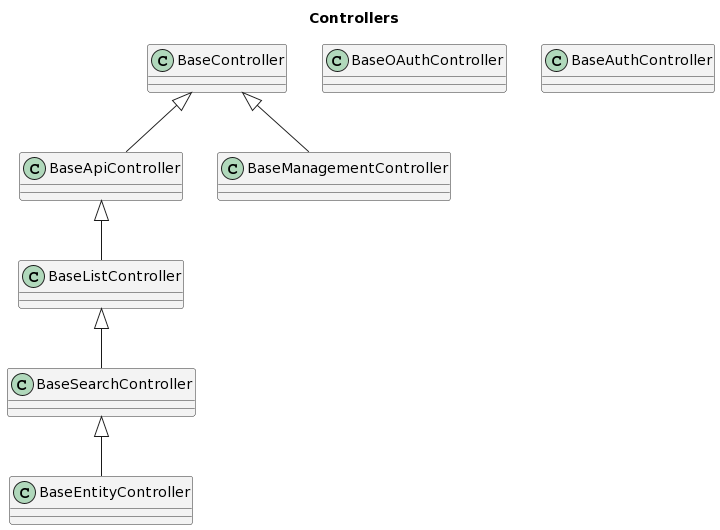
For more details on how they work, please check:
List of Controllers
- BaseController
- BaseApiController
- BaseListController
- BaseSearchController
- BaseEntityController
- BaseManagementController
- BaseAuthController (UpDevs.Sdk.Security)
- BaseOAuthController (UpDevs.Sdk.Security.OAuth)
BaseController
Provides the basic structure for all controllers in the UpDevs SDK. Service access and responses are handled here. It provides the following methods:
| Method | Description |
|---|---|
protected GetServiceSignature: TService GetService<TService>() where TService : IAppService | Retrieves an app service. |
protected GetDomainServiceSignature: TDomainService GetDomainService<TDomainService>() where TService : IDomainService | Retrieves a domain service. |
protected JsonResponseSignature: IActionResult JsonResponse(object? data = null) | Creates and return a JSON response. |
protected FilterEnumAndReturnSignature: PagedListModel<KeyValueModel> FilterEnumAndReturn(List<KeyValueModel> items, string description) | Filters a list of enum items and prepare it for return as a key/value pair. |
Although made available by the UpDevs SDK, we discourage the use of GetDomainService from the controller. It should only be used when
extremely necessary.
Usage:
public class StocksController : BaseController
{
    [HttpGet("{stockCode}/trend")]
    public async Task<IActionResult> GetTrend(string stockCode)
    {
        return await GetService<IStocksAppService>().GetTrend(stockCode);
    }
}
The above code will create the controller with the base route /stocks and one endpoint GET /stocks/{stockCode}/trend.
BaseApiController
Provides the same functionalities found in BaseController, it only adds /api to the route. For example, for the
following controller:
public class StocksController : BaseApiController
{
    // ...
}
The base route will be /api/stocks.
BaseListController
Provides the same functionalities found in BaseApiController and adds listing capabilities. It adds two new endpoints:
POST /list and POST /get-by-ids. They are represented by the following methods:
| Method | Description |
|---|---|
| List Signature: Task<IActionResult> List([FromBody] SearchRequest? data) | Returns the paged list of records using the specified filters. |
| GetByIds Signature: Task<IActionResult> GetByIds([FromBody] TId[] data) | Retrieves the records matching the provided identifiers. |
This base controller also provides new properties to restrict access, if required:
| Property | Type | Description |
|---|---|---|
protected GetByIdsRequiredClaims | string[] | List of ALL required claims the user must have to retrieve records by their IDs. |
protected GetByIdsRequireAnyClaim | string[] | List of the required claims of which the user must have AT LEAST ONE to retrieve records by their IDs. |
protected ListRequiredClaims | string[] | List of ALL required claims the user must have to list records. |
protected ListRequireAnyClaim | string[] | List of the required claims of which the user must have AT LEAST ONE to list records. |
These properties should be set in the constructor. Here's a usage example:
public class StocksController : BaseListController<IStocksAppService, StockResponse, Guid>
{
    public StocksController()
    {
        GetByIdsRequiredClaims = new[] { "stocks.list" };
        ListRequireAnyClaim = new[] { "stocks.list", "stocks.view" };
    }
}
You must provide a service interface inheriting from IListAppService or any other child, the response model and the type of the identifier.
This controller will generate the following endpoints:
POST /api/stocks/list.POST /api/stocks/get-by-ids.
BaseSearchController
Provides the same functionalities found in BaseListController and adds searching capabilities. It adds two new
endpoints: POST /search and POST /csv. They are represented by the following methods:
| Method | Description |
|---|---|
| Search Signature: Task<IActionResult> Search([FromBody] SearchRequest? data) | Returns the paged list of records using the specified filters. |
| Csv Signature: Task<IActionResult> Csv([FromBody] CsvSearchRequest? data) | Returns a CSV of records using the specified filters. |
This base controller also provides new properties to restrict access, if required:
| Property | Type | Description |
|---|---|---|
protected SearchRequiredClaims | string[] | List of ALL required claims the user must have to search records. |
protected SearchRequireAnyClaim | string[] | List of the required claims of which the user must have AT LEAST ONE to search records. |
protected CsvRequiredClaims | string[] | List of ALL required claims the user must have to get a CSV of the records. |
protected CsvRequireAnyClaim | string[] | List of the required claims of which the user must have AT LEAST ONE to get a CSV of the records. |
These properties should be set in the constructor. Here's a usage example:
public class StocksController : BaseSearchController<IStocksAppService, StockResponse, Guid>
{
    public StocksController()
    {
        SearchRequiredClaims = new[] { "stocks.search", "stocks.list" };
    }
}
You must provide a service interface inheriting from ISearchAppService or any other child, the response model and the type of the
identifier.
This controller will generate the following endpoints:
POST /api/stocks/search.POST /api/stocks/csv.POST /api/stocks/list. (from the list controller)POST /api/stocks/get-by-ids. (from the list controller)
BaseEntityController
Provides the same functionalities found in BaseSearchController and adds CRUD capabilities. It adds nine new
endpoints: GET /composite, GET /{id}, POST /, POST /with-file, PUT /{id}, PUT /{id}/with-file, DELETE /composite,
DELETE /{id} and DELETE /. They are represented by the following methods:
| Method | Description |
|---|---|
| GetComposite Signature: Task<IActionResult> GetComposite([FromQuery] TId[] ids) | Retrieves a record using its composite ID. |
| Get Signature: Task<IActionResult> Get(TId id) | Retrieves a record using its ID. |
| Create Signature: Task<IActionResult> Create([FromBody] TInput data) | Inserts a new record in the database using the model provided by TInput. |
| Create Signature: Task<IActionResult> Create([FromForm] TInput data, IFormFileCollection files) | Inserts a new record in the database using the model provided by TInput and handles the attached files. |
| Update Signature: Task<IActionResult> Update(TId id, [FromBody] TInput data) | Updates the informed record in the database using the model provided by TInput. |
| Update Signature: Task<IActionResult> Update(TId id, [FromForm] TInput data, IFormFileCollection files) | Updates the informed record in the database using the model provided by TInput and handles the attached files. |
| DeleteComposite Signature: Task<IActionResult> DeleteComposite([FromQuery] TId[] id) | Removes a record from the database matching the composite primary key provided. |
| Delete Signature: Task<IActionResult> Delete(TId id) | Removes a record from the database matching the ID provided. |
| DeleteMany Signature: Task<IActionResult> DeleteMany([FromQuery] TId[] ids) | Removes records from the database matching the IDs provided. |
This base controller also provides new properties to restrict access, if required:
| Property | Type | Description |
|---|---|---|
protected GetRequiredClaims | string[] | List of ALL required claims the user must have to retrieve a record. |
protected GetRequireAnyClaim | string[] | List of the required claims of which the user must have AT LEAST ONE to retrieve a record. |
protected CreateRequiredClaims | string[] | List of ALL required claims the user must have to create a record. |
protected CreateRequireAnyClaim | string[] | List of the required claims of which the user must have AT LEAST ONE to create a record. |
protected UpdateRequiredClaims | string[] | List of ALL required claims the user must have to update a record. |
protected UpdateRequireAnyClaim | string[] | List of the required claims of which the user must have AT LEAST ONE to update a record. |
protected DeleteRequiredClaims | string[] | List of ALL required claims the user must have to delete a record. |
protected DeleteRequireAnyClaim | string[] | List of the required claims of which the user must have AT LEAST ONE to delete a record. |
protected DeleteManyRequiredClaims | string[] | List of ALL required claims the user must have to delete many records. |
protected DeleteManyRequireAnyClaim | string[] | List of the required claims of which the user must have AT LEAST ONE to delete many records. |
This controller can be used providing the model representing the input and the response:
public class StocksController
    : BaseEntityController<IStocksAppService, StockInput, StockResponse, Guid>
{
    // ...
}
Or, only the model that represents both the input and the response:
public class StocksController : BaseEntityController<IStocksAppService, StockModel, Guid>
{
    // ...
}
These properties should be set in the constructor. Here's a usage example:
public class StocksController : BaseEntityController<IStocksAppService, StockModel, Guid>
{
    public StocksController()
    {
        DeleteRequiredClaims = new[] { "stocks.delete" };
    }
}
You must provide a service interface inheriting from IEntityAppService or any other child, the response model (or input and response) and
the type of the identifier.
This controller will generate the following endpoints:
GET /api/stocks/compositeGET /api/stocks/{id}POST /api/stocksPOST /api/stocks/with-filePUT /api/stocks/{id}PUT /api/stocks/{id}/with-fileDELETE /api/stocks/compositeDELETE /api/stocks/{id}DELETE /api/stocksPOST /api/stocks/search. (from the search controller)POST /api/stocks/csv. (from the search controller)POST /api/stocks/list. (from the list controller)POST /api/stocks/get-by-ids. (from the list controller)
BaseManagementController
Provides the same functionalities found in BaseController and adds the /report-error endpoint. For example, for the
following controller:
public class ManagementController : BaseManagementController<IManagementDomainService>
{
}
The following endpoint will be generated: /management/report-error/{id}. It is represented by the following method:
| Method | Description |
|---|---|
| ReportError Signature: Task<IActionResult> ReportError(TId id, [FromBody] ExtraErrorInfo<TId> data) | Reports an error. This is used to escalate an error. When a user receives an error message and clicks on report, this action will be called. |
You must provide a service interface inheriting from IManagementDomainService.
BaseAuthController
Provides the basic structure for basic local authentication in the UpDevs SDK. Service access and responses are handled here. It provides the following methods:
| Method | Description |
|---|---|
| Authenticate Signature: Task<IActionResult> Authenticate([FromBody] LoginInput model) | Authenticates a user. |
protected GetServiceSignature: TService GetService<TService>() where TService : IAppService | Retrieves an app service. |
protected GetDomainServiceSignature: TDomainService GetDomainService<TDomainService>() where TService : IDomainService | Retrieves a domain service. |
protected JsonResponseSignature: IActionResult JsonResponse(object? data = null) | Creates and return a JSON response. |
Although made available by the UpDevs SDK, we discourage the use of GetDomainService from the controller. It should only be used when
extremely necessary.
Usage:
public class AuthController : BaseAuthController<User, Guid>
{
    public AuthController(
        ISecurityRepository<User, Guid> securityRepository,
        ITokenService tokenService,
        SecurityMessagesResource securityMessagesResource
    ) : base(securityRepository, tokenService, securityMessagesResource) { }
}
The above code will create the controller with the base route /auth and one endpoint POST /auth.
That endpoint will check if the user is correctly authenticated and return a JWT token.
BaseOAuthController
Provides the basic structure for OAuth authentication in the UpDevs SDK. Service access and responses are handled here. It provides the following methods:
| Method | Description |
|---|---|
| Login Signature: Task<IActionResult> Login([FromBody] LoginInput loginInput) | Logs a user in. |
| OpenIdConnect Signature: IActionResult OpenIdConnect(string? callbackUrl = null) | Redirects to the OpenID login page. |
| OpenIdConnectCallback Signature: IActionResult OpenIdConnectCallback(string code, string callbackUrl) | Handles the login done through OpenID. |
| OpenIdConnectToken Signature: Task<IActionResult> OpenIdConnectToken(string authCode, string? callbackUrl = null) | Retrieves the JWT token. |
| OpenIdConnectRefresh Signature: Task<IActionResult> OpenIdConnectRefresh(string refreshToken) | Retrieves an updated JWT token with extended validation. |
| Logout Signature: Task<IActionResult> Logout(string refreshToken) | Removes token access. |
| ChangePassword Signature: IActionResult ChangePassword() | Redirects to the change password page. |
| Admin Signature: IActionResult Admin() | Redirects to the admin page. |
| UserInfo Signature: Task<IActionResult> UserInfo(string token) | Retrieves the user's claims/roles. |
protected GetServiceSignature: TService GetService<TService>() where TService : IAppService | Retrieves an app service. |
protected GetDomainServiceSignature: TDomainService GetDomainService<TDomainService>() where TService : IDomainService | Retrieves a domain service. |
protected JsonResponseSignature: IActionResult JsonResponse(object? data = null) | Creates and return a JSON response. |
protected GetCallbackUrlSignature: string GetCallbackUrl(string? callbackUrl = null) | Generates the callback URL for the application. |
Although made available by the UpDevs SDK, we discourage the use of GetDomainService from the controller. It should only be used when
extremely necessary.
Usage:
public class OAuthController : BaseOAuthController
{
    public OAuthController(IOAuthUsersService oAuthUserService) : base(oAuthUserService) { }
}
The above code will create the controller with the base route /oauth and nine endpoints, they are:
POST /oauth/loginGET /oauth/connectGET /oauth/callbackGET /oauth/tokenGET /oauth/refresh-tokenGET /oauth/logoutGET /oauth/change-passwordGET /oauth/adminGET /oauth/user-info
That endpoint will check if the user is correctly authenticated and return a JWT token.
Mapper
Mapping entities to models and vice-versa is an important part of most applications. Even though the UpDevs SDK works with Mapster and
AutoMapper, we'll be showing the example of Mapster. Should you need more information regarding either, make sure to check their
documentation. In the root of your API project, open or create the MapperConfiguration.cs file. Its content:
public class MapperConfiguration : IMapperConfiguration
{
    public void Map()
    {
        // SDK UpDevs.
        TypeAdapterConfig.GlobalSettings.ForType(
            typeof(IPagedList<>),
            typeof(PagedListModel<>)
        );

        // Your mappings.
        TypeAdapterConfig<UserInput, User>.NewConfig();
        TypeAdapterConfig<User, UserResponse>.NewConfig();
        TypeAdapterConfig<ValidationTokenInput, ValidationToken>.NewConfig()
            .Map(
                dest => dest.ExpirationDate,
                src => DateTime.UtcNow.AddMinutes(src.ValidForInMinutes)
            )
            .Map(dest => dest.CreationDate, src => DateTime.UtcNow);
        TypeAdapterConfig<ValidationToken, ValidationTokenResponse>.NewConfig();
    }
}
In this file you can add your mappings and set them up as needed. The UpDevs SDK makes sure the mappings provided here are configured according to the library selected.
No matter which mapping tool you choose, you will add your configuration inside that same file.
Exception Filter
An exception filter is required to handle exceptions thrown by the application. Inside the Filters folder, open or create the file
ExceptionFilter.cs. Here you can see its content:
public class ExceptionFilter : BaseExceptionFilter
{
    protected override async Task<string> LogExceptionAsync(ExceptionData exceptionData)
    {
        await Task.Delay(0);

        if (Server.Environment == EnvironmentType.Production)
        {
            // TODO: Change after you've created your table.
            // var record = await _logTable.AddOrUpdateAsync(new LogData
            var logData = new LogData
            {
                Severity = LogSeverity.Error,
                IsException = true,
                StackTrace = exceptionData.Exception.StackTrace ?? "",
                Message = exceptionData.Exception.Message,
                ExtraData = JsonSerializer.Serialize(
                    new
                    {
                        exceptionData.Exception.StackTrace,
                        exceptionData.Exception.Message
                    }
                )
            };
            return logData.RowKey;
        }

        return Guid.NewGuid().ToString();
    }

    protected override string GetDefaultExceptionMessage()
    {
        // TODO: Add your custom default error message.
        return "There was an error, please try again.";
    }
}
What this filter does (as it is) is to get all exceptions thrown by the application, save that exception in a table (storage, in our example) and return the ID of that newly created exception record to the consumer. But this is only done if the server is running in production mode (line 28). Another noteworthy point here is that on line 34 we can see a default error message that is returned to the consumer when an exception is thrown.
After deciding on how you'd like to log the exceptions, if at all, remember to implement your change here and to remove the TODOs from the
code.
Management Controller
To increase productivity, the UpDevs SDK handles certain common tasks, like users reporting errors inside your application. To use this
functionality, you must create a new controller and make it inherit from BaseManagementController providing the data type of your
identifier. Here's an example:
public class ManagementController : BaseManagementController<Guid> { }
For this functionality to work, you also need to implement the corresponding domain service (ref).
File appsettings.json
The only property required by the UpDevs SDK is the AllowedOrigins. All the others depend on whether you're using security/OAuth, etc.
In your appsettings.json file, just add your allowed origins (if you add more than one, just separate them using commas):
{
    // ...
    "UpDevs": {
        // ...
        "AllowedOrigins": "http://localhost:4200"
    }
    // ...
}
The allowed origins (AllowedOrigins) can be set either in this file or through your Startup.cs file using the AllowedOrigins property.